





4 min read
.png)
Clients keep asking me some version of the same thing.
“How do you use AI beyond chat?”
Chat is fine. It’s where most people start. The problem is what comes next. Skills. Subagents. Agent teams. Workflows. The vocabulary makes it sound like you need a new operating system for your brain.
You don’t.
I use one question:
How much work am I trying to hand over?
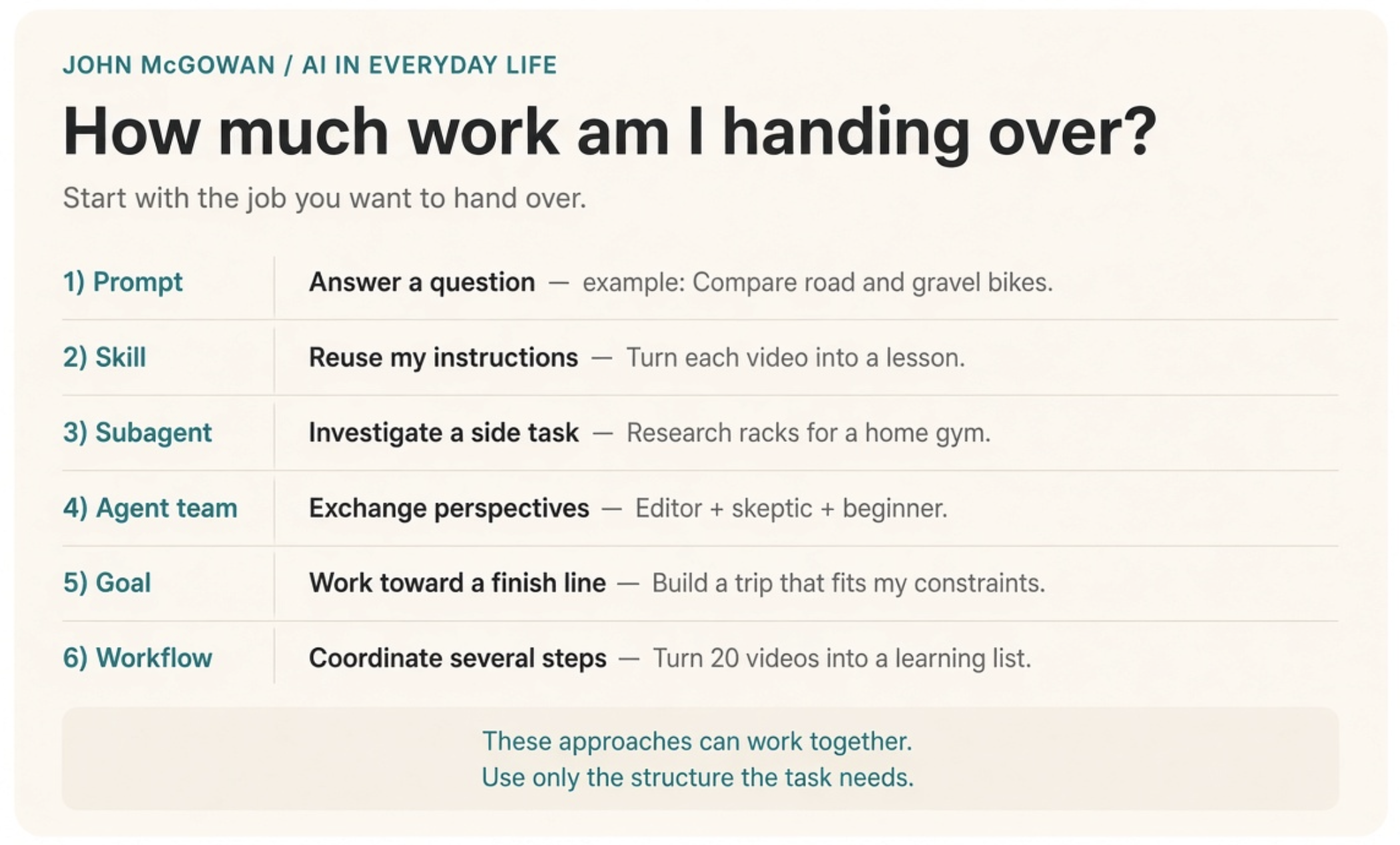
These approaches can be combined. They are not mandatory stages.
Here’s how that shows up in my own life and work. Most weeks I stay on the early rungs on purpose. I’ve already paid tuition for climbing too high too fast.
A prompt: answer this question
I was looking at a gravel bike. I asked:
“Explain the difference between a road bike and a gravel bike, including the trade-offs for someone who mostly rides on pavement.”
That’s a conversation. I ask follow-ups. I adjust my priorities. Then I decide. A straight question is often the right place to stop.
Same at work. “Summarize this partner email in five bullets” does not need an agent army.
A skill: remember how I like this done
I watch a lot of AI videos. Every time I share one, I want the same treatment: explain the useful ideas, flag what’s genuinely new, give me one exercise to try.
A skill packages that. It can also include the reference material or tools needed to do the job. I still drop in a new video. I just don’t re-explain the assignment every time.
If you keep typing the same instructions, you have a skill candidate. How skills work.
Inside a firm, that’s engagement-letter tone, status-update format, or “prep me for this client the way I like it.”
A subagent: handle this research detour
I set up a home gym recently. Choosing a rack alone can swallow a whole conversation. Dimensions. Install requirements. Reviews.
So I hand that off. Return three racks that fit the space. Explain the trade-offs. Link the evidence. A subagent does the detour in its own context and brings back only what I need. That’s useful whenever a side task would otherwise take over the main thread. How subagents work.
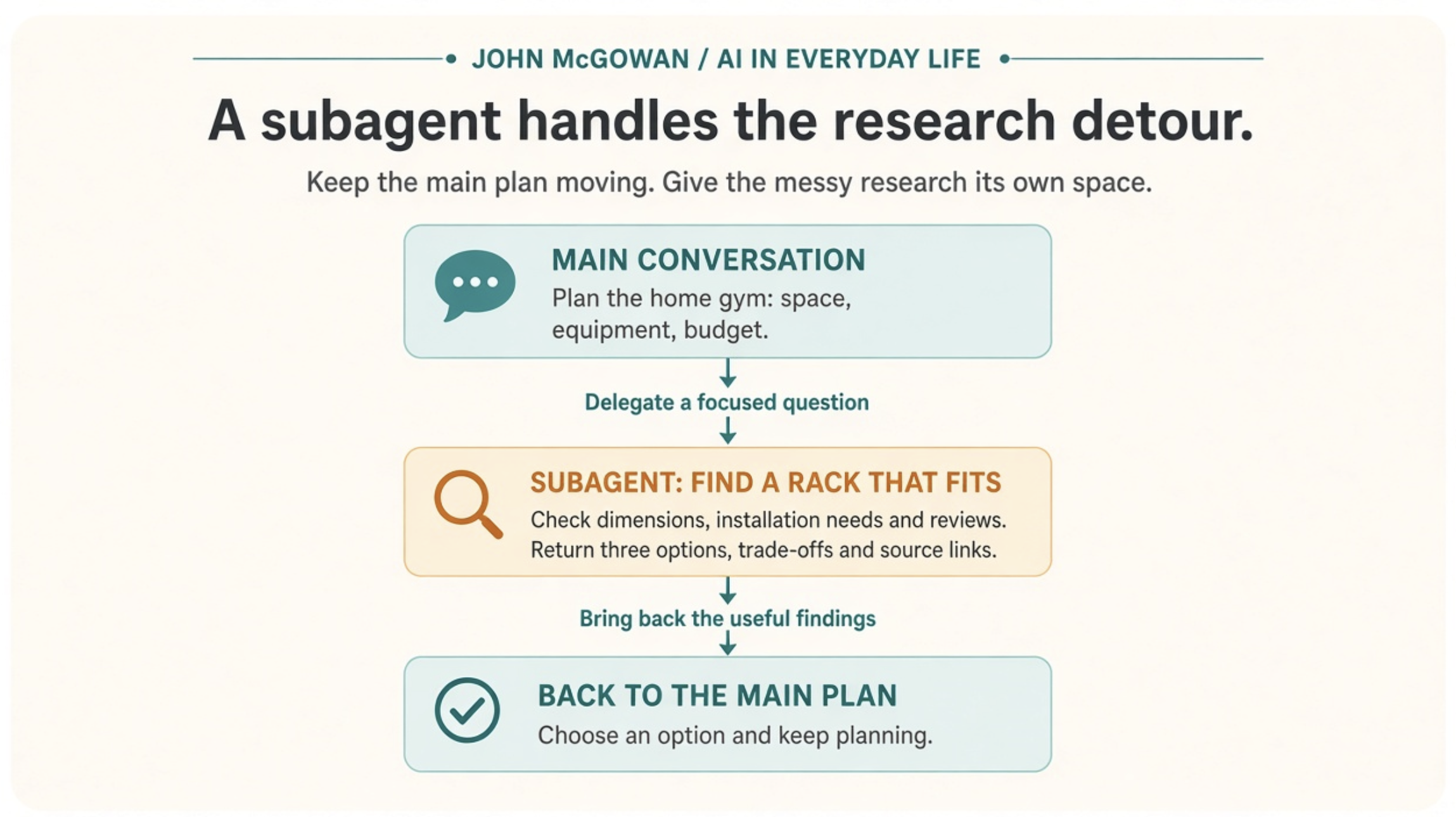
Give the side task a clear assignment and a useful return format.
An agent team: work through competing perspectives
When I’m drafting a newsletter, I sometimes want an editor on clarity, a skeptic on unsupported claims, and a beginner spotting jargon.
In a team, those voices can push on each other. The editor cuts a paragraph. The beginner explains why that example mattered. I still make the call.
That back-and-forth is the only reason to use a team. It adds overhead. I only want it when the decision actually benefits from argument. Agent collaboration.
A goal: work toward a clear finish line
In Claude Code, /goal is an actual slash command. You give it a completion condition, and it keeps working across turns without you prompting every step. It checks progress after each turn. It can stop if the condition is met, judged impossible, or an error needs your attention. The broader idea is goal-directed work. /goal is one way to put it into practice. How the command works.
Think about a weekend itinerary with a fixed budget, three must-do activities, and a limit on driving time.
The assignment is to check the draft against those requirements and revise until they hold, or explain which constraint can’t be met. Set a time or spending limit for the work too.
The important part is defining done. “Make my trip better” is too open. “Fit these activities into two days without exceeding this budget” gives the process something to check.
Same for firm work. “Improve this memo” is vague. “Cut to one page, keep the recommendation, remove jargon a first-year associate wouldn’t know” is a finish line.
A workflow: coordinate the whole process
Back to the videos. Now imagine a backlog of 20.
A workflow can pull the available transcripts, analyze videos independently, combine the findings, remove duplicate ideas, and produce a ranked learning list. Some steps can run in parallel. Others wait for earlier results. Workflows can combine several of the approaches above. Workflow patterns.
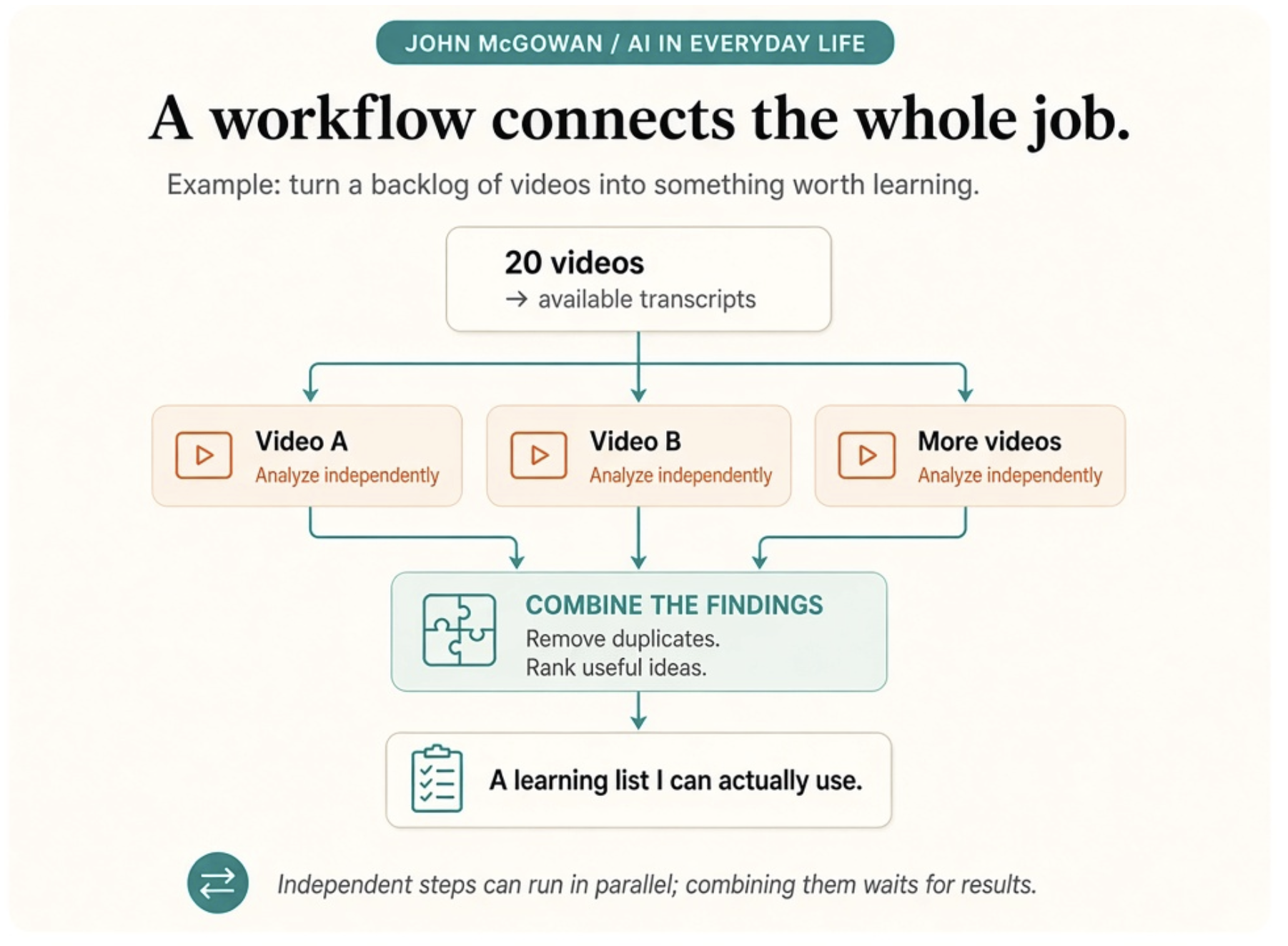
A workflow can include parallel work, sequential steps, and revision loops.
Width (many jobs at once) is powerful. It is also where cost and complexity spike. More agents. More material read. More of my time reviewing the result. I don’t reach for it unless the work truly breaks into independent pieces that can run side by side.
I learned that the expensive way. I spun up a wide multi-step job for something a single focused pass would have finished. I burned through a chunk of usage and still had to rewrite half the output. The lesson stuck. I now judge a workflow by one thing: did the final result save me time and actually change what I do next?
Where connections fit, and what adds cost
If I want “when can I watch these,” the system needs calendar access. If I want my learning priorities, it might need my HubSync wiki (my knowledge base). If I want outputs filed, Document Management (the firm file system). Connections, including MCP, give access to tools and information inside the permissions you grant. Connecting tools.
More agents and more rounds of work mean more processing. Model choice and how much material each agent reads also drive usage. That can show up as a larger bill or faster burn on a subscription. Then there’s my time reviewing the result. Usage considerations.
None of this replaces professional judgment. In accounting work, AI can draft, research, and organize. A human still owns review, compliance, and the client call.
So my rule as CEO is the same one I’d give a managing partner.
Start with one task you repeat. Write down the input, the result you want, and what “good” looks like. Try it in chat first. Only then decide what deserves a reusable skill, a side agent, or a full workflow.
New capability is not the same as the right tool for today’s job.
That’s also how we’re building Halo. Clients should be able to move beyond the prompt without overbuilding on day one.
What’s one task you’d like AI to take further than answering a question? Give some of these more advanced techniques a try.
If this was useful, subscribe to my newsletter on LinkedIn. Every issue, I'll share one practical way I'm using AI in my own work and life, and what I'd tell a firm leader to try next.